How to Be Sure That Your Figma Design Matches Your Live Website
.avif)
Your work, as a designer, is best described as glorified attention to details. Everything matters, from the font to the coloring, element size and spacing, and the overall polish. Everything needs to fall in line. The problem is that it never does.
That’s when the post-work editing begins, adding hours of tinkering to an already long and exhausting project. The main pain point is the back-and-forth with the developing team, trying to get everything done with the first try.
Except you never do.
How Dual Check Makes Visual Testing Easy
Dual Check eliminates the need for tab switching between the Figma design and the live website. Instead, you now have a functional overlay that exposes the differences between the two at the sweep of a slider.
Not only is this more comfortable, but more effective as well. An element just one inch out-of-position, the typography varying by a minuscule margin, or a slightly different color shade – all these differences will be vastly more glaring. The slider makes the comparison between the Figma design and the live page considerably easier.
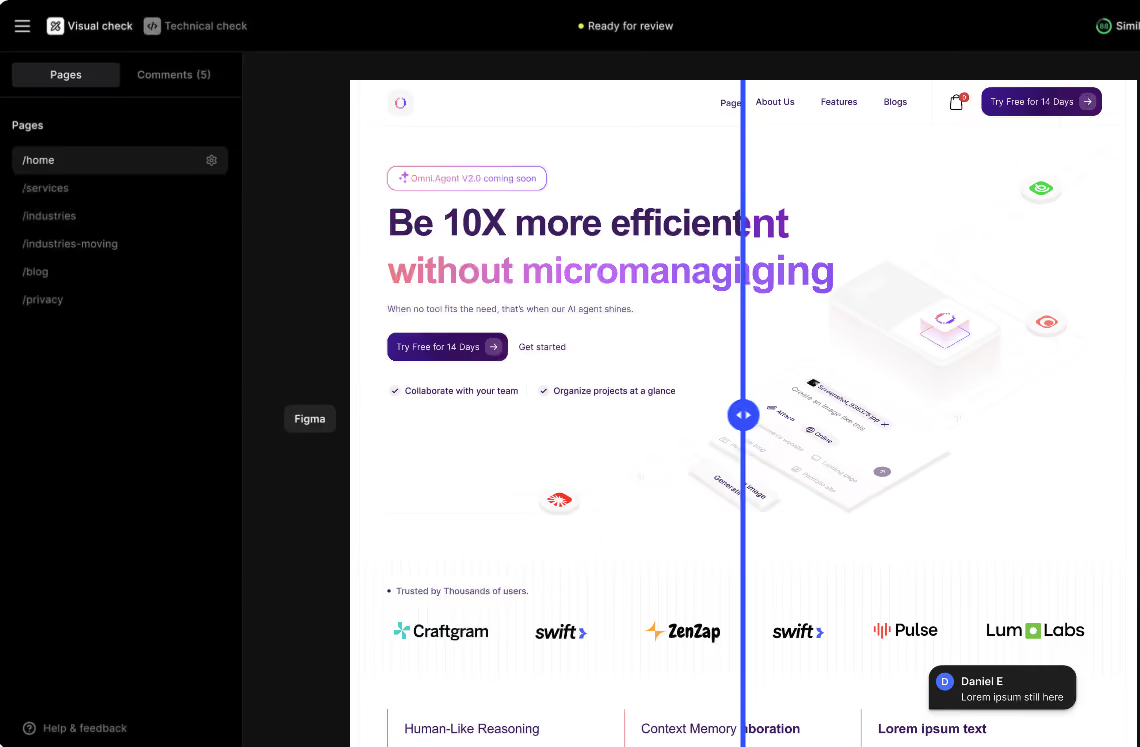
More importantly, Dual Check reduces or even eliminates the back-and-forth with the developer(s). The feature responsible for that is the ability to leave comments right there where the problem is.
This flagging system allows developers to identify the problem immediately and understand exactly what they need to do. No cross-checking needed, no miscommunication, and no delays.
Dual Check – The Solution to Sluggish Visual Quality Checks
Dual Check helps everybody save time and deliver a better product faster. The app’s main strong points speak for themselves:
- Slider-based overlay, for an easier comparison between the Figma design and the live website
- Bug-flagging system, allowing you to leave comments on the problematic areas
- No more back-and-forth between the designer team and the devs
- A ‘Status’ system that marks pages as Draft, Ready for Review, Needs Changes, and Approved
Dual Check makes everybody’s lives easier by streamlining the editing process, helping the QA team diagnose the problems faster, and removing the time-burning back-and-forth between the different departments.
You can register here if you want to try our Dual Check tool today.