How to Be Sure Your Marketing Website Is Pixel Perfect

You spent weeks getting the design right. The typography is deliberate, the spacing is intentional, and every color has been chosen carefully.
Then development wraps up, the designer opens the site, and the first thing they notice is that nothing quite matches.
It's not that the developer did a bad job. It's that without a reliable way to compare the design to the live build, small differences are almost guaranteed to slip through. This is where visual regression testing and visual testing tools make the job a lot easier.
The Limits of Manual Review
A marketing website lives and dies by its visual polish. Unlike internal tools or dashboards, a marketing site is often the first impression a potential customer gets of your brand.
When a heading is slightly too heavy or a section has inconsistent padding, it signals a lack of attention to detail.
The challenge is that checking for these issues manually is genuinely tedious. A designer opens the Figma file in one tab and the live site in another, zooming in on sections, trying to memorize spacing values, and mentally comparing what they're seeing.
Because of how slow it is, things get missed. Details that were obvious in the mockup become harder to spot in a browser, especially across different screen sizes.
The result is a review process that takes longer than it should and still doesn't catch everything, which is exactly the gap visual regression testing tools are meant to solve.
DualCheck: A Better Way to Do Visual Testing
The most effective way to verify that a live page matches its design is to look at both simultaneously. Not tab-switching, actually overlaying one on top of the other so differences become immediately visible.
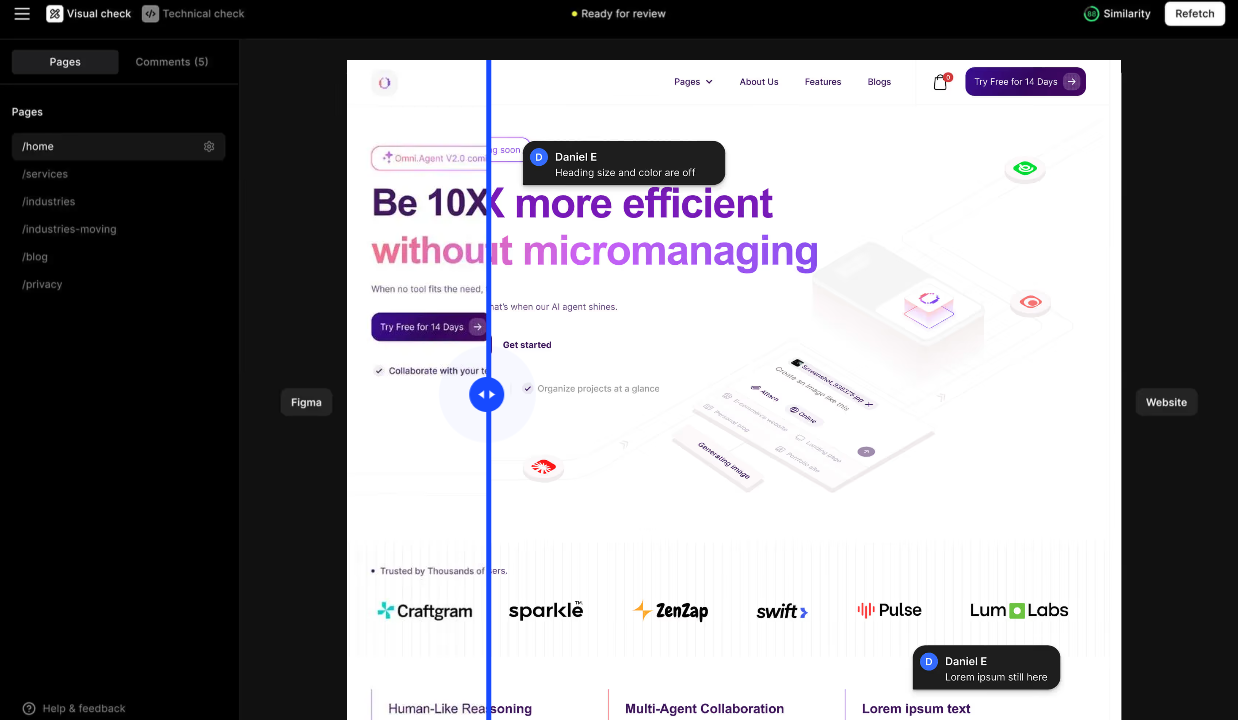
This is exactly what DualCheck is built for. You compare the live site with the corresponding Figma design, and DualCheck overlays them with a slider. Dragging the slider reveals any discrepancies in spacing, typography, color, or layout instantly.
There's no guesswork involved. If something doesn't match, you can see it directly.
When you spot an issue, you can drop a comment exactly where the problem is on the page. Developers don't have to decode a vague description; they can see the exact section being flagged and compare it themselves.
Start using DualCheck today.
Review and Ship With Confidence
They say time is money, and in 2026 that's never been more true for teams shipping websites. Every hour spent on manual review, chasing feedback, or fixing issues that should have been caught earlier is an hour that could have gone toward something else.
DualCheck gives your team the tools to move faster without missing anything:
- Everything lives in one place
- Designs and live pages are compared instantly
- Issues are flagged and tracked in context
- Review status is visible to the whole team
- Launch with confidence, not crossed fingers